Parking Facility#
Each parking location in the network is represented as an individual agent in POLARIS. Parking facilities are loaded from the supply database and are spatially linked to the road network through links, activity locations, and zones. The parking agent manages capacity, reservations, pricing, and the lifecycle of individual parking events.
Parking Types#
POLARIS supports the following parking facility types, each read from the Parking table in the supply database:
Type |
Description |
|---|---|
Garage |
Structured parking garage (also used for airport parking) |
Lot |
Surface parking lot (also used for park-and-ride / transit lots) |
Street |
On-street curbside parking (unmetered) |
Meter |
On-street metered parking |
Location |
Generic parking associated with a specific activity location |
External |
Parking at external stations |
Sink |
Sink parking used for special modeling purposes |
Loading Dock |
Freight loading dock (B2B heavy-duty trucks) |
Loading Zone |
Freight loading zone (B2C light-duty trucks) |
Loading Dock and Loading Zone are freight-specific parking types. They do not have walk links assigned during network initialization and are searched separately from passenger parking. For details on how freight vehicles use these facilities, see Freight Vehicle Parking.
Each parking facility stores:
Capacity: The total number of vehicle spaces available.
Zone: The traffic analysis zone the parking facility belongs to.
Links: The drive-access link(s) and, optionally, a walk-access link for multimodal routing.
Activity location: The activity location the parking is associated with.
E-scooter availability: The number of shared e-scooters docked at the facility, enabling micro-mobility access/egress.
Capacity Management#
Parking capacity is tracked in real time. Two lists are maintained:
Parking list: Vehicles currently physically parked at the facility.
Reservation list: Vehicles that have reserved a spot but have not yet arrived.
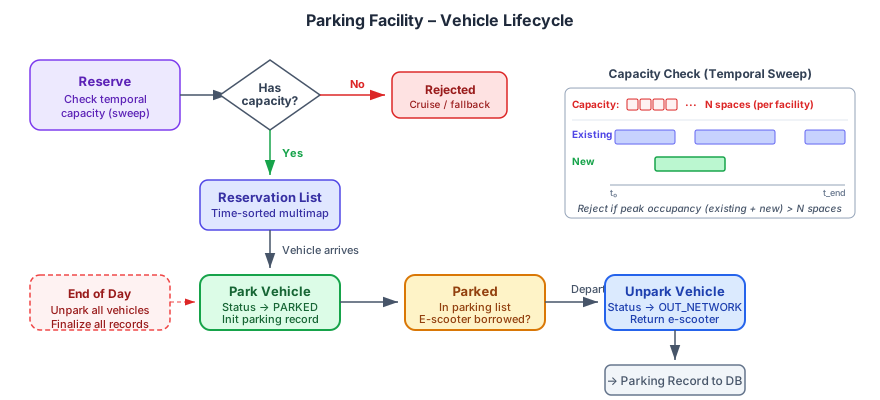
Instantaneous capacity checks compare the current parking list size to the total number of spaces. For reservation-based capacity checks, a temporal sweep algorithm is used: reservation time windows are compared against existing reservations and currently parked vehicles to find the peak simultaneous usage at any point in the requested time window. A reservation is only accepted if peak usage does not exceed the facility’s capacity.
Pricing Rules#
Each parking facility can have one or more pricing rules, each defining:
Field |
Description |
|---|---|
|
The granularity of pricing: Free, Flat, Minute, Hourly, Daily, Monthly, or Yearly |
|
Priority for rule selection |
|
Minimum cost charged regardless of duration |
|
Minimum duration required to use this rule |
|
Maximum duration that can be covered by this rule |
Prices are time-of-day dependent, stored as a lookup by rule ID and simulation time. The cost calculation algorithm greedily allocates the parking duration across applicable rules, choosing the cheapest option at each step. For example, a 10-hour stay might be covered by an hourly rule for the first 3 hours and a daily flat rate for the remainder.
A facility is classified as free if the cost for a 24-hour stay is zero.
Park and Unpark Operations#
The figure below illustrates the complete lifecycle of a vehicle through the parking facility—from reservation to parking, through the parked state, and finally unparking with record output. It also depicts the temporal sweep algorithm used for capacity checks.
Parking a Vehicle#
When a vehicle arrives at a parking facility:
The system checks whether the vehicle holds an existing reservation. If so, the reservation is converted to an active parking event and the vehicle is marked as parked.
If no reservation exists, instantaneous capacity is checked. If space is available, a new parking info record is created and the vehicle is marked as parked.
If e-scooters are available at the facility and the person agent is eligible, an e-scooter is borrowed for access/egress to the final destination. The e-scooter count is decremented accordingly.
Unparking a Vehicle#
When a vehicle departs a parking facility:
The vehicle is located in the parking list.
If an e-scooter was borrowed, it is returned and the facility’s e-scooter count is restored.
A parking record is finalized with the actual exit time, computed cost, and e-scooter usage, and is pushed to the demand database for output.
The vehicle status is updated to indicate it has left the network.
If the actual parking duration exceeds the anticipated duration by more than 20%, a debug warning is logged for overstaying.
End-of-Day Cleanup#
At the end of the simulation day, all vehicles still parked are automatically unparked, their records are finalized, and any outstanding reservations are flagged with a warning.
Reservation System#
Vehicles (both personal and TNC) can reserve a parking spot ahead of arrival. A reservation specifies:
The vehicle requesting the spot
The anticipated start time
The anticipated duration
The reservation is accepted only if the facility has temporal capacity (verified by the sweep algorithm described above) and the estimated cost is below a threshold. Reservations are stored in both a list and a time-sorted multimap for efficient overlap checking.
When the vehicle arrives and parks, the reservation is consumed and removed from both data structures.
Spatial Indexing#
Parking facilities are indexed spatially using an R-tree, organized by parking type. This enables efficient nearest-neighbor queries used by both the pre-trip parking choice model and the en-route parking search. The network provides nearest-parking-search capabilities that return sorted lists of nearby parking facilities and their distances from a given location or link.
Activity locations also maintain pre-computed lists of nearby free and paid parking facilities with their distances, enabling fast lookups during the en-route parking search.