9. Model Building#
9.1. Supply Editor#
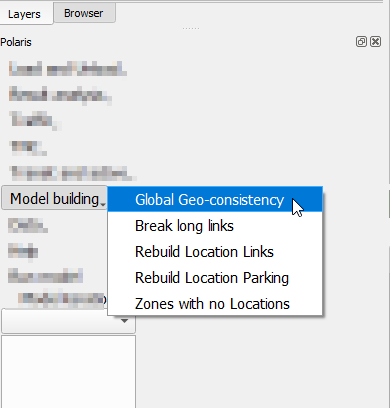
There are elements in the Supply database that are rather static relationships between several elements of the network, and therefore atomic operations to enforce such would not make much sense.
To have access to these operations, one can access Menu Polaris → Supply Editor after opening the network, as shown on the imagine to the right.
There are two things to keep in mind before using any of these tools, however:
They may take a long time to run, depending on the size of the network
Data is deleted at the start of each process (with the exception of Global Geo-Consistency), so stopping said processes will break the supply file as far as Polaris is concerned.
These changes, which may depend on user input for specific parameters, are not expected to be frequent, as most of these changes are necessary when bulk data import is made to the network or new data (links, locations, zones, etc.), are introduced in the supply.
9.1.1. Global Geo-consistency#

The global-Geo-consistency tool is responsible for rebuilding the spatial references across tables required by Polaris, such as the Zone, link and walk link to which each location is associated.
The user may choose any combination of geo-associations to run, as they are independent processes that will be ran in sequence.

9.1.2. Breaking long links#

Due to the micro-simulated nature of Polaris, as well as some of the assumptions made during the loading of the demand onto the network, the existence of very long links may create localized distortions that might be difficult to diagnose when running a model.
For this reason, it is recommended that you have no links longer than 1km in your network, and all networks regularly maintained by the team at Argonne already follow this practice.
When building a new network or analyzing the impact of link lengths, however, this tool can be leveraged to enforce a maximum link length in the network by breaking links longer than the desired threshold.
Stopping this tool while it is running might permanently corrupt your network, so it is recommended that you back it up before starting.
9.1.3. Rebuilding the Location_Links table#

The Location_Links table dictates which links can be accessed by each location.
There are two different assumptions that can be used when building this table.
The first is that each location can only access its closest link, in which case the “Multiple Links per location” check box should be left unchecked.
The second possibility is that a location can access up to 4 links (within a distance threshold), such that the links are the closest one, plus three others at 90, 180 and 270 degrees from the direction that connects the location to the closest link.
The latter is the standard assumption.
9.1.4. Rebuilding the Location_Parking table#

The Location_Parking table associates the closest parking facilities to each location.
During the table re-creation process, parking locations are created to coincide with the Location positions every time there is no pre-existing parking facility within the threshold determined by the user, which results in a Parking with potentially as many entries as the Location table. Additionally, parking facilities tagged as corresponding to a specific location are not associated to any other location on the Location_Parking table.
9.1.5. Fixing zones with no locations#

One of the common issues to prevent Polaris from running successfully is the existence of zones to which no locations are assigned. Although it would be reasonable to expect that the construction of the model would see that this does not happen, it is useful to have a method to quash that problem if it does happen.
In order to make sure the analyst is fully aware of the changes they are making to the supply file, this tool is built as a two-step process:
First the user needs to identify all zones with no locations (which will be selected on the map)
Execute the creation of one location per identified zone