Population Synthesis Analysis#
After a population has been synthesized and
used in a POLARIS run, you typically want to verify that the synthetic
population actually matches the control marginals it was built from. The
PopsynComparator class does this comparison and produces validation plots.
For working with the synthetic population itself (loading, modifying, saving), see the Population page.
Quick start#
If your model is in a standard US Census-based context, the easiest way to get
started is PopsynComparator.from_dir:
from polaris.analyze.popsyn_analysis import PopsynComparator
from polaris.prepare.popsyn.linker_file import LinkerFile

linker = LinkerFile(my_run_dir / "linker_file.txt", project_dir=my_run_dir)
comparator = PopsynComparator.from_dir(my_run_dir, sample_factor=1.0, linker_file=linker)

comparator.summarise()                              # logs aggregate match rates
comparator.generate_comparison_plots(geo_level=0, linker=linker)  # scatter plots
from_dir loads the population from the demand database (using the same fast
HDF5 cache as Population.from_dir) and constructs a default
USCensusMapping strategy automatically.
Geographic mapping strategies#
Validation has to bridge three geographic levels:
household location — whatever lives in the
household.locationcolumn of the demand database. This is model-specific.popsyn region — the geographic unit at which control marginals are defined (e.g., a US Census tract).
survey region — the geographic unit at which the seed sample is provided (e.g., a US PUMA).
The GeoMappingStrategy interface abstracts over this. Two implementations
ship with polaris-studio:
USCensusMapping#
Maps household.location to a US 2010 Census tract and then to a PUMA using the
standard Census Bureau crosswalk. It supports three encodings for the location
column, selected via LocationMode:
Mode |
|
Extra data needed |
|---|---|---|
|
small POI IDs that index |
supply_db (auto-loaded) |
|
full 10-11 digit Census tract GEOIDs |
none |
|
15 digit Census block GEOIDs |
|
The recommended constructor is from_location_mode, which loads all required
crosswalks up front (so any I/O errors surface immediately rather than at plot
time):
from polaris.analyze.geo_mapping import USCensusMapping, LocationMode

geo_mapping = USCensusMapping.from_location_mode(
    location_mode=LocationMode.POI,
    supply_db=my_run_dir / "MyModel-Supply.sqlite",
    puma_id_contains_state_id=False,
)
If location_mode is None, it defaults to POI when supply_db is available
and otherwise TRACT.
Avoiding the remote crosswalk download. By default the PUMA-to-tract
crosswalk is downloaded from the Census Bureau on first use. To use a local
copy (for testing, offline work, or pinning a specific vintage), pass
puma_to_tract_csv:
geo_mapping = USCensusMapping.from_location_mode(
    location_mode=LocationMode.TRACT,
    puma_to_tract_csv=my_data_dir / "2010_Census_Tract_to_2010_PUMA.txt",
)
The CSV must follow the standard Census Bureau format with STATEFP,
COUNTYFP, TRACTCE, and PUMA5CE columns.
CustomMapping#
For non-US regions or any model whose geography doesn’t fit the Census tract→PUMA hierarchy, supply your own mapping DataFrames:
from polaris.analyze.geo_mapping import CustomMapping

geo_mapping = CustomMapping(
    popsyn_region_col="sa1_zone",
    survey_region_col="sa3_zone",
    location_to_popsyn=location_to_sa1_df,  # columns: ["location", "sa1_zone"]
    popsyn_to_survey=sa1_to_sa3_df,         # columns: ["sa1_zone", "sa3_zone"]
)

comparator = PopsynComparator(population, 1.0, linker, geo_mapping=geo_mapping)
The two DataFrames must be complete: any household with no match in
location_to_popsyn or any popsyn region with no match in popsyn_to_survey
will raise.
Producing validation plots#
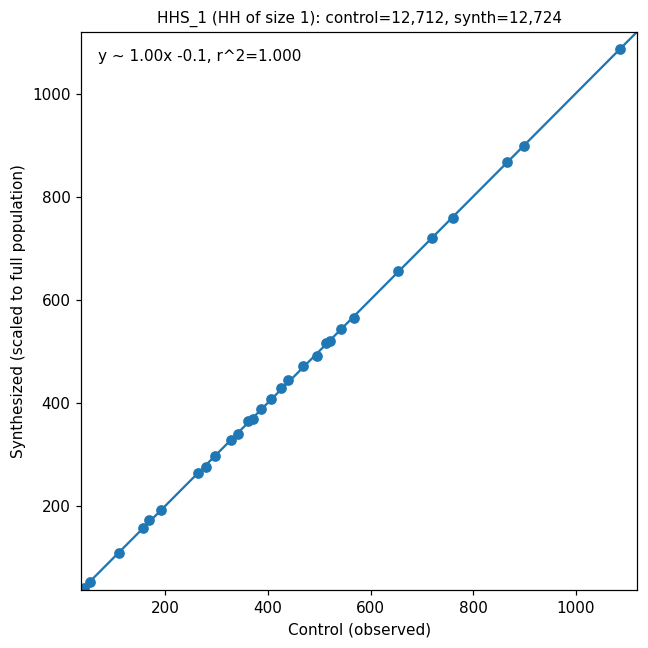
generate_comparison_plots produces a grid of scatter plots — one per control
variable (household size, age band, race, etc.) — comparing the control
marginal on the x-axis against the synthesized count on the y-axis. The
geo_level argument controls aggregation: 0 for popsyn region (tract), 1
for survey region (PUMA).
Each subplot shows the per-region observed vs. synthesized counts, an OLS
regression line with r², and a y=x reference (dotted grey). A good fit
hugs the y=x line:
For a single comparison, use the lower-level
PopsynComparator.compare_synthpop_to_controls directly — it returns the
underlying merged DataFrame so you can inspect or further analyze the data:
comp = PopsynComparator.compare_synthpop_to_controls(
    control_data, synth_data,
    sample_fac=1.0,
    geo_col_index=0,
    compare_name="HHS_1",
    ax=my_axes,
)
# comp has columns ["control", "synthesized"], one row per geo unit
The plotting helper plot_scatter(obs, synth, ...) is also exposed as a class
method if you want to draw the same y=x reference + OLS overlay on your own
data.
API Reference#
Strategy for mapping households to popsyn and survey regions. |
|
US Census-based geographic mapping (tract → PUMA). |
|
Custom geographic mapping via user-provided DataFrames. |
|
How household home locations are encoded in the demand database household.location column. |